Audit Like a Pro: The Best Free Website Audit Tools

Kyle Eggleston
Chicago SEO Consultant since 2004LinkedIn

On this page
- The Best Free Audit Tools to Check Your Website Right Now
- What is a Website Audit and Why Does It Matter in 2026?
- Choosing the Right Free Audit Tool for Your Website
- The Best Free Website Audit Tools for 2026
- From Insights to Action: Improving Your Website Post-Audit
- Leveraging Audits for Business Growth and Lead Generation
- Frequently Asked Questions about Website Audits
- Conclusion
The Best Free Audit Tools to Check Your Website Right Now
If you just want a quick answer, here are the top free audit tools available in June 2026:
| Tool | Best For | Key Limit |
|---|---|---|
| Ahrefs Site Audit | Technical SEO | 5,000 pages/month |
| Semrush SEO Checker | On-page + AI visibility | 3 checks/day free |
| SEOptimer | Agencies + white-label reports | Feature limits on free tier |
| Crab | Desktop crawling, no URL limits | Desktop only |
| AudioEye Scanner | Accessibility (WCAG) | Single-page scan |
| FreeSiteAudit | Quick overall health score | Limited depth on free tier |
| Ultimate Auditor | SEO + security + performance | Single URL |
| SEODiff | AI readiness diagnostics | 10 pages |
| FreeDPOTool | Cookie compliance (GDPR/CCPA) | Browser extension only |
Your website could be losing customers right now and you wouldn’t even know it. A free audit tool can surface the exact issues — broken links, slow load times, missing meta tags, accessibility failures — that quietly push potential leads toward your competitors.
Over 90% of all online searches happen on Google. If your site has technical problems, Google’s crawlers notice them before your customers do. And in 2026, it’s not just Google you need to worry about. AI-powered search tools like ChatGPT and Google’s AI Overviews are increasingly deciding which businesses get mentioned — and which ones get ignored.
The good news? You don’t need to spend hundreds of dollars a month to find out where you stand.
I’m Kyle Eggleston, an SEO and AI technology consultant who has worked with businesses of all sizes to identify and fix the exact issues a free audit tool can uncover — and turn those findings into real revenue growth. In the sections below, I’ll walk you through the best free options available right now and how to actually use them.
What is a Website Audit and Why Does It Matter in 2026?
A website audit is a comprehensive health check of your digital storefront. Just like a physical building inspector looks at the foundation, plumbing, and electrical systems, a free audit tool scans your website’s code, structure, speed, and content to identify hidden problems.
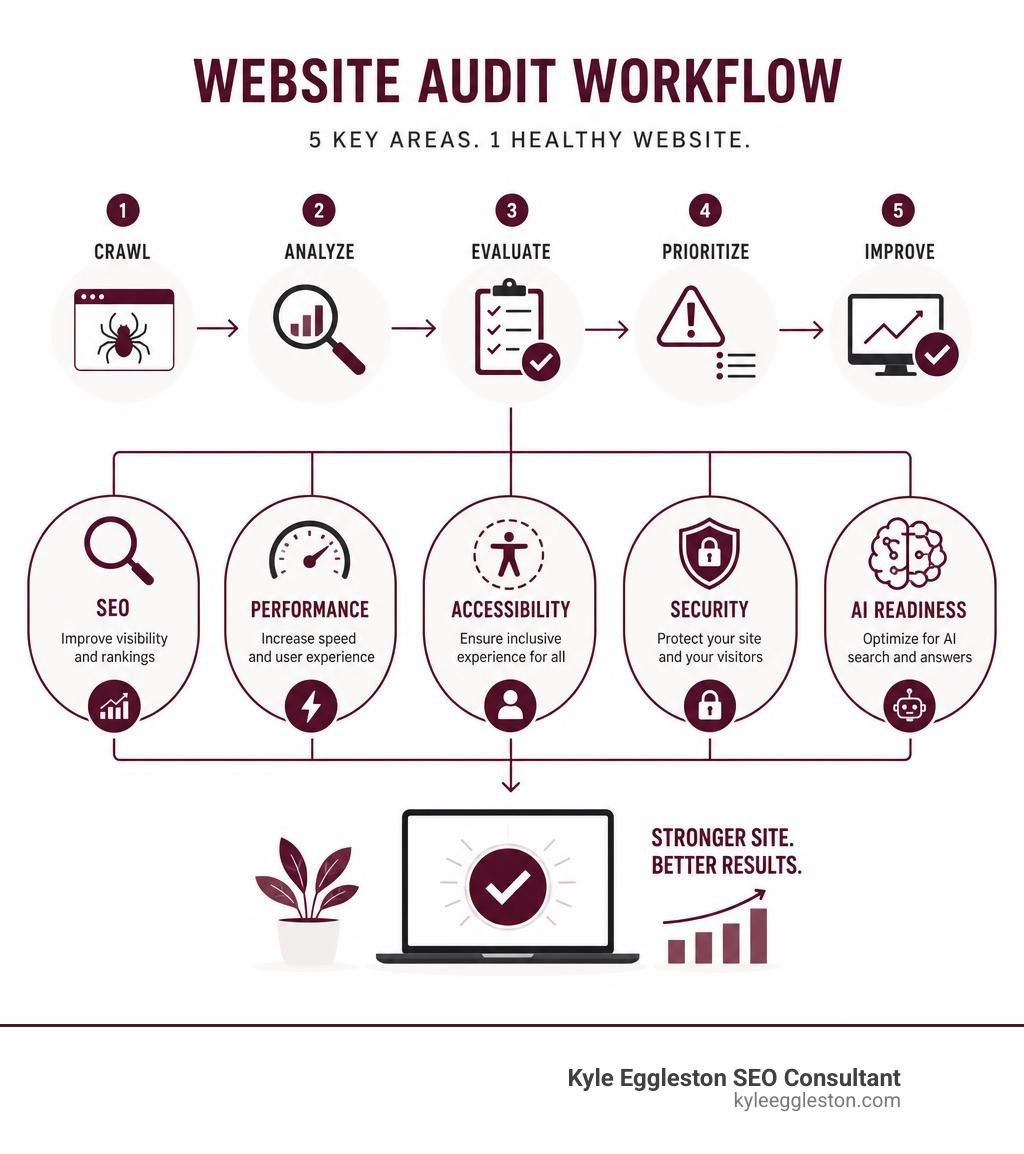
In June 2026, a standard audit is no longer just about stuffing keywords into title tags. A modern website audit evaluates five critical pillars:
- Search Engine Optimization (SEO): Making sure search engine spiders can easily crawl, index, and understand your content. Correct technical on-page optimization is one of the main signals Google uses to determine site quality.
- Performance and Speed: Ensuring your pages load instantly. Slow sites frustrate users and get demoted in search rankings.
- Accessibility (WCAG Compliance): Ensuring that your site is usable for everyone, including those with visual, auditory, motor, or cognitive impairments. Currently, 1 in 4 adults in the U.S. has a disability. Ensuring compliance with the Americans with Disabilities Act (ADA) and the European Accessibility Act (EAA) is not just a legal necessity — it is also good business. In fact, organizations like the Accessibility – Illinois Auditor General emphasize how accessible design translates to better reach for all users.
- Security and Privacy: Checking for valid SSL certificates, secure headers, and proper cookie consent management.
- AI Search Visibility and Generative Engine Optimization (GEO): Evaluating how easily Large Language Models (LLMs) like GPT-4, Claude, and Gemini can extract, cite, and summarize your business information.

As search behavior shifts toward conversational queries, your site must be fully optimized for both humans and AI bots. If your structured data is missing or your site has hydration-heavy JavaScript errors, AI engines will fail to extract your data, resulting in a complete loss of visibility in AI-generated answers. To keep your site ahead of these changes, we always recommend brushing up on our Best SEO Practices Webpage.
Choosing the Right Free Audit Tool for Your Website
With so many free options on the market, choosing the right free audit tool depends entirely on your goals. Some tools excel at deep technical crawls, while others focus on quick on-page grades or compliance checks.
While free tools are incredible starting points, it is important to understand how they compare to paid enterprise platforms. Free tools almost always come with limitations, such as restricted crawl depth, daily scan caps, or basic recommendations without deep step-by-step fix instructions.
For example, a free tool might tell you that you have 50 broken links, but it won’t integrate with your development pipeline or offer automated daily monitoring. For a look at our curated list of resources, you can check out our comprehensive guide on SEO Tools.
Here is a quick breakdown comparing free and paid audit solutions:
| Feature | Free Audit Tools | Paid/Enterprise Audit Tools |
|---|---|---|
| Crawl Limits | Usually capped (e.g., 5,000 pages/month or single-page scans) | Millions of pages, unlimited crawls |
| Accuracy | High for standard checks, but may miss complex, multi-step user paths | Extremely high, includes staging environment testing |
| AI & GEO Tracking | Basic diagnostics and schema validation | Advanced AI citation tracking and share-of-voice metrics |
| Accessibility Coverage | Detects 20-30% of WCAG issues automatically | Deep programmatic scans + manual expert testing |
| Reporting | Standard PDF or web-based dashboard | Fully customized, white-label, multi-lingual PDF reports |
Key Features of a Modern Free Audit Tool
When you are testing out a free audit tool, you should look for features that go beyond basic keyword counts. A truly useful tool must evaluate:
- Core Web Vitals and Page Speed: Metrics like Largest Contentful Paint (LCP) and Cumulative Layout Shift (CLS) directly impact user experience and Google rankings.
- Mobile-Friendliness: Since Google uses mobile-first indexing, your mobile site layout must be flawless.
- Technical SEO and Crawlability: The tool should identify redirect chains, orphan pages, and canonical tag errors.
- Structured Data and Schema Validation: This helps search engines and AI models understand the context of your products, events, or local business listings.
- AI Readiness and Cookie Compliance: Ensuring your site is ready for LLM scrapers while respecting user privacy laws like GDPR and CCPA.
For a deeper dive into assembling your digital marketing toolkit, take a look at Kyle’s All U Need SEO Tool List.
The Best Free Website Audit Tools for 2026
To help you audit like a pro, we have rounded up the standout free tools available this year, highlighting where they shine and how they differ.
1. Crab: The Unlimited Desktop Technical Crawler
If you are looking for a completely free alternative to expensive desktop crawlers like Screaming Frog, Crab – Free SEO Crawler & Technical Site Audit Tool is a game-changer. Written as an open-source tool, Crab has crawled over 10 million URLs and earned more than 2.5k GitHub stars.
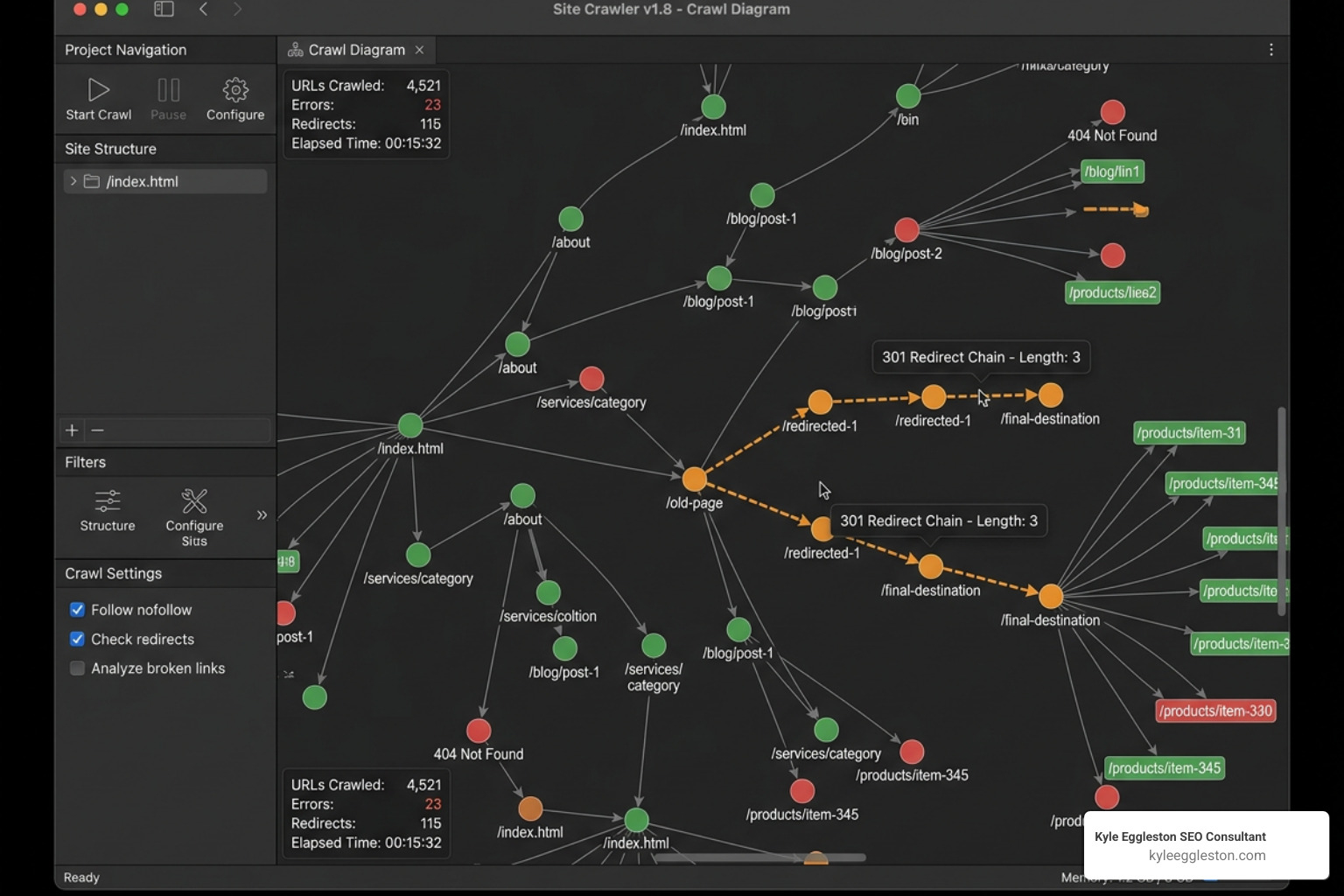
Because it runs locally on your macOS, Windows, or Linux machine, your data stays completely private. There are no subscription fees, no crawl limits, and no “free for only 500 URLs” catches. It executes JavaScript using headless Chrome, maps out your site structure, identifies redirect chains up to a 10-hop safety limit, and checks for duplicate content using advanced simhash fingerprinting.
2. Ultimate Auditor: The Multi-Category Security & Performance Scanner
For a fast, holistic check of your site’s infrastructure, Ultimate Auditor — Free Website Audit Tool | SEO, Security & Performance | ZIRA Software is an exceptional choice. It analyzes over 60 checkpoints across SEO, performance, security, and accessibility in under five minutes.
What makes it unique is its real-time streaming results and its focus on security infrastructure. It doesn’t just look at meta tags; it checks your SSL certificates, email security protocols (like SPF, DKIM, and DMARC), and security headers (like CSP and HSTS) to ensure your business and user data are safe.
3. FreeDPOTool: The Privacy and Cookie Compliance Specialist
Privacy regulations are tighter than ever in 2026. FreeDPOTool – Free Cookie Audit & Consent Compliance Tools for DPOs is a free browser extension designed specifically for Data Protection Officers and website managers.
Instead of waiting hours for a slow cloud scan, FreeDPOTool lets you run a professional cookie audit in just 15 minutes. It features a visual red/green timeline that catches pre-consent cookie violations instantly, generating evidence-ready reports with direct legal references to GDPR, CCPA, and ePrivacy laws.
4. AudioEye Scanner: The Accessibility Champion
While standard SEO tools might check if your images have alt text, a dedicated accessibility tool is required to ensure you aren’t shutting out disabled users. The Top 10 Free Website Audit Tools to Boost Performance – AudioEye guide highlights how their free scanner detects up to 2.5x more accessibility issues than standard automated checkers.
Because screen readers navigate web pages in a very similar way to search engine crawlers, fixing accessibility issues like heading structures, color contrast, and keyboard navigation directly boosts your search engine rankings and site speed.
Note: If you are looking for other niche audits, such as academic tracking or local social media health, you can check out resources like the Degree Audit | Office of the Registrar | Illinois or local community initiatives like the Free Social Media Audit | St. Charles, Illinois .
From Insights to Action: Improving Your Website Post-Audit
Running a free audit tool is only half the battle. The real magic happens when you turn those raw metrics into a structured action plan.
Once your report is generated, group the findings into three categories:
- Critical Errors (Fix Immediately): Broken links (404s), server errors (500s), blocked pages in robots.txt, missing SSL certificates, or severe mobile layout issues.
- Warnings (Optimize Next): Missing meta descriptions, slow-loading images, duplicate title tags, or missing schema markup.
- Notices (Fine-Tune Later): Minor accessibility suggestions, self-referential canonical tags, or minor CSS styling improvements.
When reviewing these fixes, determine what you can handle yourself (DIY) versus what requires a developer. For example, writing unique 150-character meta descriptions is an easy DIY task, while fixing render-blocking JavaScript or setting up complex redirect rules in your server configuration usually requires developer support.
To make sure you aren’t making common mistakes during this phase, take a look at our guide on 5 SEO Mistakes Made Experts. If your goal is specifically to climb the search engine results pages, read our step-by-step blueprint on How to Rank Higher Google.
How to Maximize Results with a Free Audit Tool
To get the most out of your free audits, you must pair them with Google’s own free webmaster tools.
A free audit tool gives you a point-in-time snapshot, but connecting your site to Google Search Console and Google Analytics allows you to track the real-world impact of your fixes over time.
After implementing changes based on your audit:
- Submit your updated XML sitemap via Google Search Console to request a recrawl.
- Monitor your “Index Coverage” report to ensure your technical errors are clearing.
- Track user behavior metrics in Google Analytics to see if your page speed optimizations are successfully reducing bounce rates and increasing conversions.
Leveraging Audits for Business Growth and Lead Generation
If you run a digital agency, manage freelance web design projects, or operate a local B2B service in the Chicago area, free website audits are one of the most powerful client acquisition engines available.
By offering a free, white-label audit report to prospective clients, you transition your sales pitch from a generic cold email to a value-first, evidence-based consultation. Showing a local business owner exact screenshots of their broken checkout page, slow mobile load speeds, or missing local schema instantly establishes trust.
At Kyle Eggleston SEO Consultant, we have helped local businesses across Illinois streamline this process. Providing clear, jargon-free audit data helps prospective clients understand exactly where their site is falling short and why they need professional help to fix it. If you want to see how we analyze and optimize websites firsthand, you can sign up for a Free SEO Consultation.
Frequently Asked Questions about Website Audits
How often should I run a website audit?
As a baseline, we recommend running a technical website audit at least once a quarter. However, you should trigger an immediate fresh audit if you migrate to a new Content Management System (CMS), complete a major design overhaul, launch a massive batch of new landing pages, or notice a sudden drop in your organic search traffic.
Can a free audit tool help with AI search visibility and GEO?
Yes. Modern free tools like SEODiff and Semrush look specifically at “AI Readiness.” They evaluate whether your site’s structured data (Schema.org markup) is properly configured, check if your robots.txt file is accidentally blocking AI crawlers like GPTBot or ClaudeBot, and analyze whether your page content is written in a clear, semantic structure that LLMs can easily parse and cite.
Are free audit tools accurate enough for compliance?
Free tools are excellent for catching obvious compliance gaps, such as missing cookie consent banners or basic WCAG contrast issues. However, they typically only detect 20% to 30% of all potential accessibility and privacy violations. For full legal compliance under WCAG, ADA, or GDPR, automated tools must be paired with manual testing, keyboard navigation checks, and expert human reviews.
Conclusion
A free audit tool is the perfect starting point to lift the hood on your website, find hidden technical blockages, and lay out a roadmap for digital growth. Whether you are using a deep technical desktop crawler like Crab, checking your security with Ultimate Auditor, or auditing your privacy compliance with FreeDPOTool, these free resources provide enterprise-level insights without the enterprise price tag.
But remember: an audit report is only as valuable as the actions you take afterward.
If you are a business owner in Chicago or across Illinois looking for a personalized, results-driven strategy backed by over 20 years of hands-on experience, we are here to help. From resolving complex technical SEO bugs to optimizing your site for the next era of AI search, we can turn your audit findings into sustained organic growth.
Ready to optimize your digital presence? Check out our complete guide on SEO Best Practices or reach out to us today to schedule your custom strategy session.
